

Scenario: The application crashes during peak hours, leaving users unable to access the platform. The single server behind the system reaches its limit, and there is no capacity left to handle requests..
The verdict: The system must scale fast.
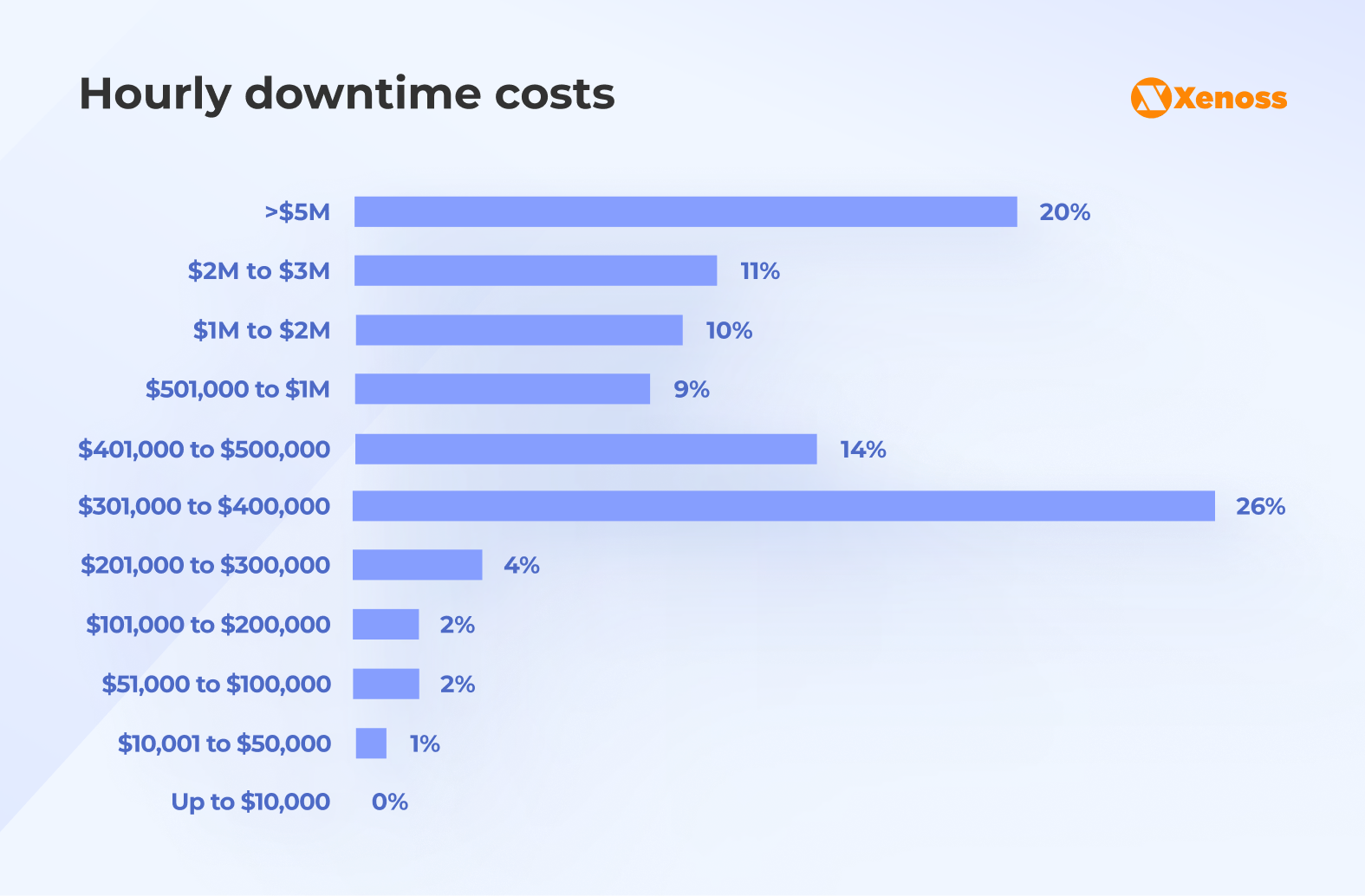
Incidents like this are both expensive and frustrating. Atlassian indicates the average cost of downtime is $5,600 per minute. Information Technology Intelligence Consulting (ITIC) reports that the average downtime costs enterprises $300,000 and can reach $5 million.
Traffic spikes make the problem worse. During major seasonal events like Christmas and Black Friday, content delivery traffic jumps to more than 80%, overwhelming architectures that were never designed to scale quickly.
There are two primary paths:
- Vertical scaling (upgrading the current server);
- Horizontal scaling (adding more servers).
Each approach solves different problems. Choosing the wrong one can lead to unnecessary infrastructure spend, persistent performance problems, and infrastructure that still fails under real-world load.
In this guide, we look at both scaling strategies. We investigate when each one firsts, what they cost, and how to decide between horizontal and vertical scaling.
What is scalability in cloud environments?
Scalability measures how your system handles increased demand. Your infrastructure must adapt when traffic spikes, user counts grow, or data volumes expand.
Good scalability protects against downtime. A well-designed system increases capacity smoothly as demand grows and contracts during low-activity periods to optimize cost.
Poor scalability leads to overloaded servers, slow response times, and lost revenue.
Scalability has three dimensions:
- Scaling up (adding more CPU, RAM, or storage to existing servers).
- Scaling out (adding more servers).
- Scaling down (reducing resources when demand drops).
Cloud providers like AWS, Google Cloud, and Azure make scaling easier. They offer auto-scaling tools that automatically adjust computing resources so your infrastructure responds to demand in real-time.
This flexibility is one of the core advantages of cloud-native architectures: capacity adjusts based on actual usage.
Vertical scaling: Adding power to a single server
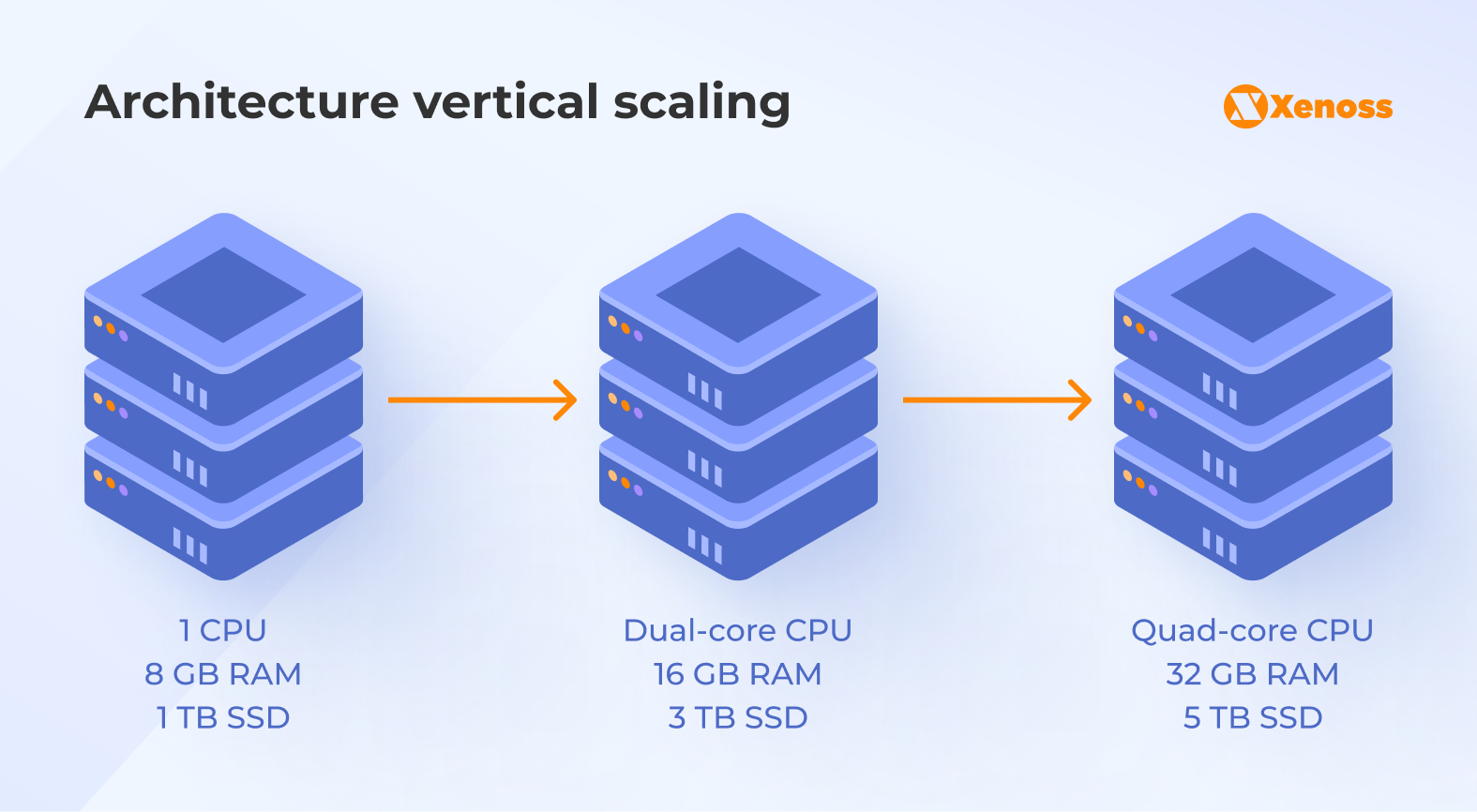
Vertical scaling involves upgrading your existing server. You can add more central processing unit (CPU) cores, increase random-access memory (RAM), or expand storage capacity.
This approach keeps the architecture simple while applications run on a single server rather than multiple servers. Teams doesn’t need to distribute workload or manage various nodes.
This approach keeps architecture simple. There is only one machine to configure, monitor, and update. Workload distribution is unnecessary, and teams can avoid the complexity of managing distributed systems.
How vertical scaling works
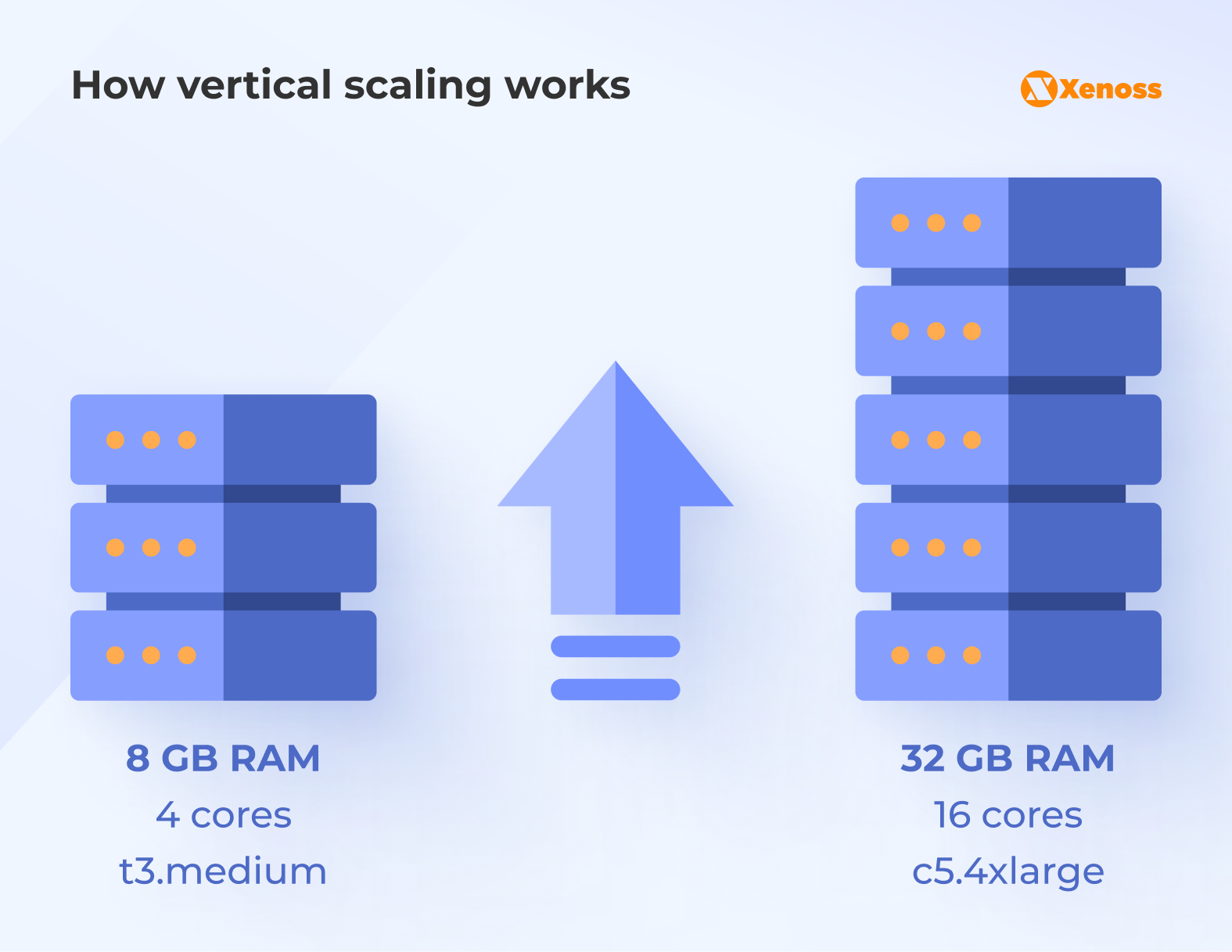
For example, a database server has 8 GB RAM and 4 CPU cores. Performance slows as data grows. In this context, vertical scaling involves upgrading the server to 32 GB of RAM and 16 cores.
The process boosts the capacity of a single machine. The same software runs on more powerful hardware; no need to change the code or redesign the architecture.
Cloud platforms make vertical scaling straightforward:
- On AWS, change the EC2 instance type from t3.medium to c5.4xlarge.
- On Azure, resize a virtual machine.
- In Google Cloud, modify Compute Engine settings.
When vertical scaling works best
Use vertical scaling when:
- The application can’t run across multiple machines
- You need quick performance improvements without redesign
- Current traffic fits one powerful server
- Short maintenance windows are acceptable
- Legacy software that requires a single machine
PostgreSQL, MySQL, and MongoDB perform better with more memory and faster processors on single-server deployments. Data remains in one location, enabling queries to run faster without network latency.
Vertical scaling advantages
- Simplified management.
- Maintain one machine instead of many.
- Monitoring, updates, and troubleshooting stay straightforward.
- Teams need fewer tools and less training.
- Lower initial complexity.
- No load balancers required.
- No distributed system challenges.
- The existing code runs without modification.
- Cost-effective for moderate growth.
- Vertical scaling is cheap and straightforward initially.
- Upgrading one server costs less than building a distributed infrastructure.
Vertical scaling is essentially the “bigger box” approach: make the machine stronger and let your existing code run faster.
Vertical scaling limitations
- Hardware limits exist. Every server has a maximum CPU, RAM, and storage capacity. Eventually, upgrades hit the ceiling.
- Single point of failure. When one server crashes, everything stops. No backup systems exist, and downtime means complete service interruption.
- Scaling interruptions. Vertical scaling may require restarting a server. This causes brief outages that can disrupt user service during upgrades.
- Expensive at scale. High-end servers cost exponentially more. A server with 10x the resources might cost 20x the price.
Vertical scaling provides simplicity, but it cannot support rapid growth, global distribution, or high availability on its own.
Horizontal scaling: Distributing load across multiple servers
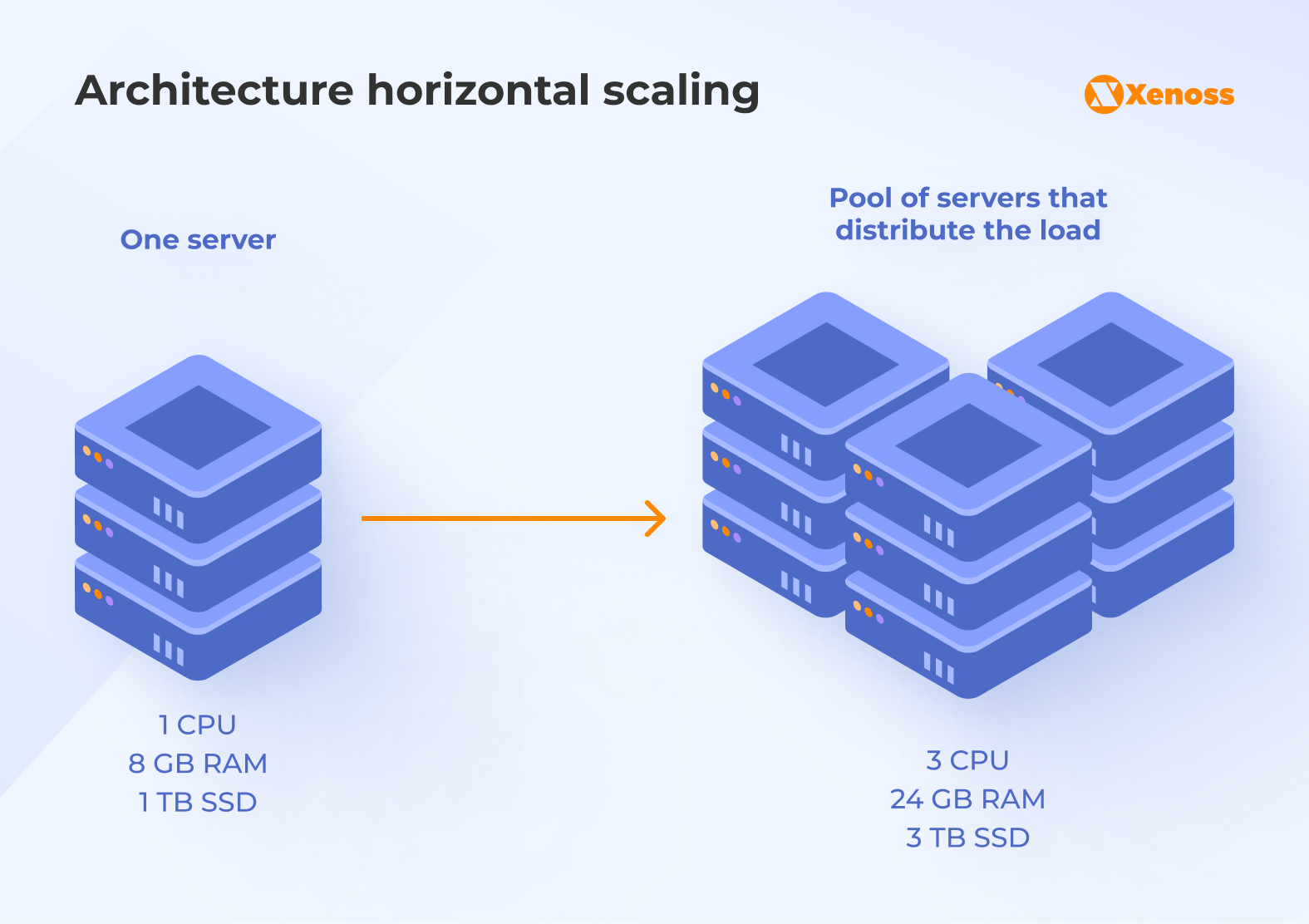
Horizontal scaling adds more machines to your infrastructure. Instead of making a single server stronger, a cluster of multiple servers works together.
This approach provides virtually unlimited growth potential. As traffic increases, you add more servers behind a load balancer. Each server runs the same application code, so any node can process any request.
How horizontal scaling works
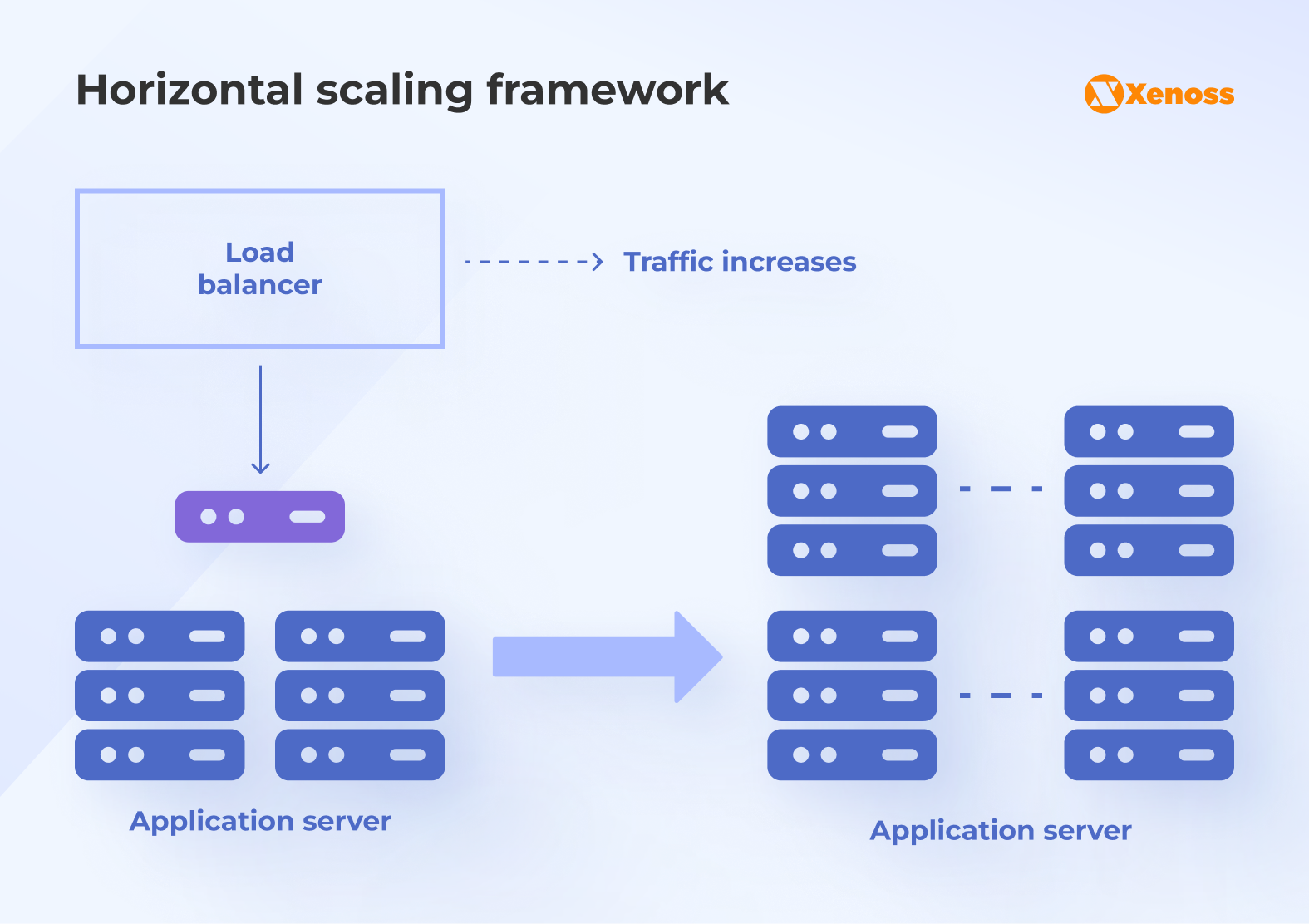
- Everything starts with two application servers behind a load balancer.
- Traffic increases → more servers added.
- The load balancer sends requests across multiple machines.
Every new machine is an identical copy of the application environment. This supports seamless distribution of requests, provided the application is designed to run on multiple instances.
When horizontal scaling fits your needs
Use horizontal scaling when:
- You expect rapid or unpredictable growth
- High availability matters more than simplicity
- Application supports distributed architectures
- A business serves users across multiple geographic regions
- Downtime costs exceed infrastructure complexity
Web applications, APIs, and microservices scale well horizontally. Each service instance runs independently, while users connect to any available server. Fault tolerance improves because multiple machines provide redundancy.
Horizontal scaling advantages
- Unlimited growth potential.
- Keep adding servers as needed.
- No hard limits on capacity.
- Handle millions of requests per second.
- Better fault tolerance.
- One server crashes while others keep working.
- Redundancy protects production workloads.
- No single point of failure.
- Flexible resource allocation.
- Add or remove servers as demand changes.
- Pay only for active resources.
- Ideal for fluctuating traffic patterns.
- Geographic distribution.
- Place servers close to users.
- Reduce latency through multi-region deployments.
- Improve global performance.
Horizontal scaling challenges
- Increased complexity. Managing multiple servers requires sophisticated tools and processes, such as load balancers, health checks, and orchestration platforms. Teams need experience managing distributed architectures.
- Data consistency concerns. Distributed systems make data synchronization harder. Multiple servers must share state, which makes database operations more complex.
- Higher initial costs. Load balancers, monitoring systems, and management tools add both complexity and expenses.
- Network dependencies. Communication between servers adds latency. The more moving parts there are, the greater the potential for failures.
Horizontal scaling is the approach teams choose when “just buy a bigger server” stops working. It adds more machines, spreads the load, and covers a single point of failure.
Comparing vertical and horizontal scaling strategies
Both scaling approaches solve performance problems differently. Understanding their trade-offs helps you choose the right scaling strategy.
| Aspect | Vertical scaling | Horizontal scaling |
|---|---|---|
| Resource changes | Add CPU, RAM, and storage to the existing server | Add more servers to distribute the load |
| Implementation speed | Fast - change instance type | Slower - requires a load-balancing setup |
| Application changes | None required | May need architecture modifications |
| Cost at a small scale | Lower initial investment | Higher due to additional infrastructure |
| Cost at a large scale | Exponentially expensive | More cost-effective at scale |
| Downtime risk | Yes, during upgrades | Minimal with proper setup |
| Failure resilience | Single point of failure | Multiple machines provide backup |
| Maximum capacity | Limited by hardware | Nearly unlimited |
| Management complexity | Simple - one machine | Complex - many machines |
| Geographic reach | Limited to one location | Can span global regions |
Performance differences
Vertical scaling delivers immediate performance gains by running the same application on faster hardware without code changes. This increases the response time.
Horizontal scaling offers better long-term performance. Traffic spreads across multiple servers. Each server processes fewer requests, preventing bottlenecks and enabling the system to handle massive spikes.
Production metrics from real systems
- Single vertical server: 15,000 requests per second maximum
- Five horizontal servers: 60,000 requests per second total capacity
- Vertical scaling: 5 minutes of downtime per upgrade
- Horizontal scaling: zero downtime with rolling updates
Cost structures
Vertical scaling starts cheaper. You pay for one server, with no load-balancer or orchestration-tool fees.
A basic AWS t3.large instance costs $55.20 per month. Upgrading to c5.4xlarge costs $490 per month. That’s an 8x cost increase for roughly 5x performance.
Horizontal scaling costs more initially. You need load balancers (a base price of $0.0225 per hour), monitoring tools ($40-50/month), and multiple server instances. Three t3.medium instances, plus infrastructure, cost $180 per month.
The choice between horizontal and vertical scaling becomes cost-based at scale. Beyond certain thresholds, adding servers costs less than buying bigger machines.
Making the right scaling decision for your infrastructure
Choosing between horizontal and vertical scaling depends on more than performance alone.
Factor #1. Evaluate application architecture
Applications built with stateless microservices scale horizontally easily. Each service instance runs independently, and traffic can be routed to any node.
Legacy monolithic applications rely on shared state, tightly coupled components, or single-machine constraints. In many cases, refactoring them for horizontal scaling costs more than upgrading the underlying hardware.
Key questions to assess architectural readiness:
- Can your application handle requests on any server?
- Does your database support replication?
- Is session data stored in memory or external caches?
- Can multiple instances of your code run simultaneously?
Applications that answer “yes” to these questions benefit from horizontal scaling.
Factor #2. Consider growth trajectory
Stable, predictable demand often makes vertical scaling the practical option. Teams can plan hardware upgrades, and scheduled maintenance windows cover the expected downtime.
Fast or unpredictable traffic growth usually requires horizontal scaling. Auto scaling absorbs sudden spikes and adjusts capacity without manual intervention.
- E-commerce platforms see increased traffic during holiday sales.
- Media sites experience viral content surges.
- Gaming platforms face launch-day floods.
These scenarios require horizontal scaling.
Factor #3. Analyze failure tolerance requirements
For internal tools, vertical scaling is often enough. Teams can upgrade hardware during off-hours to limit disruption, and short outages usually do not affect core operations.
Customer-facing platforms need horizontal scaling. Users expect 99.9% uptime or better. Running multiple servers removes single points of failure, so if a single node fails, traffic shifts to the remaining nodes without a visible impact.
Factor #4. Calculate the total cost of ownership
In the short term, vertical scaling often wins on cost. You spend less on infrastructure, management stays simpler, and teams do not need deep distributed-systems expertise.
Over the long run, growing applications usually benefit from horizontal scaling. Adding standard servers often costs less than buying top-tier hardware, and cloud scaling with auto-scaling groups helps keep spending aligned with real demand.
Here’s a scaling cost calculator as a starting point.
Include these costs in your analysis:
- Hardware or instance fees
- Network and bandwidth charges
- Observability, monitoring, and alerting
- Engineering time for implementation
- Training and operational expenses
- Downtime costs during scaling events
Vertical scaling suits monoliths, steady traffic, and simple operations. Horizontal scaling fits distributed apps, spiky demand, and strict uptime targets.
Real-world scaling examples from production systems
Major technology companies demonstrate both scaling strategies in production.
Netflix: Horizontal scaling for global streaming
Netflix runs on AWS with thousands of EC2 instances. The architecture spreads content delivery across multiple regions, and each service component scales independently.
Their video encoding pipeline uses horizontal scaling. Encoding a single title can involve 100 servers working in parallel, resulting in roughly 10x faster processing than a purely vertical setup.
This model helps Netflix support more than 200 million subscribers watching simultaneously. The infrastructure adjusts capacity minute by minute as demand shifts.
Stripe: Vertical scaling for payment processing
Stripe’s payment processing requires strong consistency. In a distributed setup, financial transactions cannot tolerate conflicting records, so Stripe uses vertical scaling for its core payment databases.
Their PostgreSQL instances run on powerful single machines with 512 GB of RAM and 64 CPU cores. This setup processes millions of transactions per day while preserving data integrity.
Stripe combines approaches:
- Payment processing uses vertical scaling.
- API servers use horizontal scaling.
This hybrid approach balances performance, reliability, and safety.
Shopify: Hybrid scaling for e-commerce

Shopify demonstrates how to choose between horizontal and vertical scaling. Application servers scale horizontally, while databases scale vertically.
During flash sales, Shopify’s horizontally scaled application tier spreads traffic spikes across many servers. Auto scaling groups add capacity within seconds, enabling the platform to handle surges of up to 50,000 concurrent shoppers per merchant.
Their MySQL databases follow a vertical-first model with read replicas. Primary databases run on high-memory instances, and read replicas scale horizontally to share the read load.
Implementing vertical scaling on cloud platforms
All major cloud providers support vertical scaling with minimal configuration effort. While the underlying mechanisms differ slightly, the process always involves resizing an existing compute instance to a more powerful one.
AWS vertical scaling process
AWS EC2 instances can be resized through the console or the API. Stop the instance, change the instance type, then start it again. AWS offers hundreds of instance types tuned for different workloads.
- Memory-optimized instances (r5, r6i) are well-suited for databases.
- Compute-optimized instances (c5, c6i) serve application workloads.
- Storage-optimized instances (i3 and d2) are well-suited for data-heavy operations.
Amazon RDS databases support vertical scaling with only brief connection interruptions. Multi-AZ deployments keep downtime to a minimum during upgrades.
Google Cloud and Azure approaches
In Google Cloud Compute Engine, you can resize a virtual machine by selecting a new machine type or customizing the CPU/RAM combination. Google Cloud offers predefined instance types or custom configurations tailored to performance needs.
Memory-intensive or compute-heavy workloads can be upgraded without modifying application code, similar to AWS.
Managed databases such as Cloud SQL support vertical scaling by adjusting performance tiers without requiring hands-on server configuration.
Azure virtual machines support vertical scaling through resize operations. You pick a new VM size from the available series, and Azure handles the infrastructure changes.
Both platforms provide managed database services with built-in vertical scaling, so you adjust performance tiers without dealing with low-level server configuration.
Building horizontally scaled architectures
Horizontal scaling requires deeper architectural planning than vertical scaling. Your application must support distributed deployment, consistent routing, and shared state across multiple servers.
1. Essential components
Load balancers distribute incoming traffic across multiple servers. They monitor server health, remove failed servers from rotation, and route traffic to healthy instances.
- AWS Application Load Balancer (ALB) handles increased HTTP traffic.
- Network Load Balancer (NLB) serves TCP connections.
- Google Cloud Load Balancing offers similar capabilities.
Kubernetes clusters group multiple servers into managed node pools. Container orchestration platforms deploy, scale, and operate distributed applications, and they support rolling updates with no planned downtime.
2. Stateless application design
Horizontal scaling often requires stateless applications. Avoid storing session data in server memory, and use external caching tools such as Redis or Memcached instead.
Each request should succeed on any server. User sessions live in shared storage, and shopping carts, login states, and preferences sit in databases or distributed caches.
This design makes scaling straightforward. You add servers without data migration and remove servers without losing user state.
3. Database considerations
Relational databases often struggle with horizontal scaling. Most SQL engines favor vertical scaling for consistency-critical writes. Databases must support replication or sharding to handle distributed read/write operations.
Vertical scaling for primary databases: write-heavy workloads often remain on powerful single nodes
Read replicas: queries are offloaded to replica servers for read-heavy traffic
Sharding (manual or framework-based): splitting data across nodes for distributed writes
Databases like Cassandra, DynamoDB, and MongoDB are designed for horizontal scaling:
- Data partitioned across many servers
- Each node responsible for a subset
- Automatic replication and failover
- Built-in sharding for write distribution
These systems support large-scale, globally distributed workloads.
Cost optimization strategies for both approaches
Cost optimization looks different depending on whether your system scales vertically or horizontally. Each model has unique levers for controlling spend, and understanding these differences helps ensure that scaling decisions stay aligned with business goals.
1. Vertical scaling cost controls
Vertical scaling is initially cheaper but becomes expensive as you approach the performance limits of high-end servers.
Right-size instances on a regular schedule. Teams frequently overprovision CPU, memory, or storage. Track real usage, and downgrade instances when you see consistent headroom.
Use reserved instances or savings plans for predictable workloads.
- AWS offers up to 72% discounts for long-term commitments.
- Azure and Google Cloud provide similar programs.
Schedule non-production instances to run only when needed. Development and test servers do not need to stay up 24/7, and automated start/stop schedules cut costs.
2. Horizontal scaling cost controls
Auto scaling helps prevent overprovisioning. You define minimum and maximum server counts, then scale based on CPU utilization, request volume, or custom metrics.
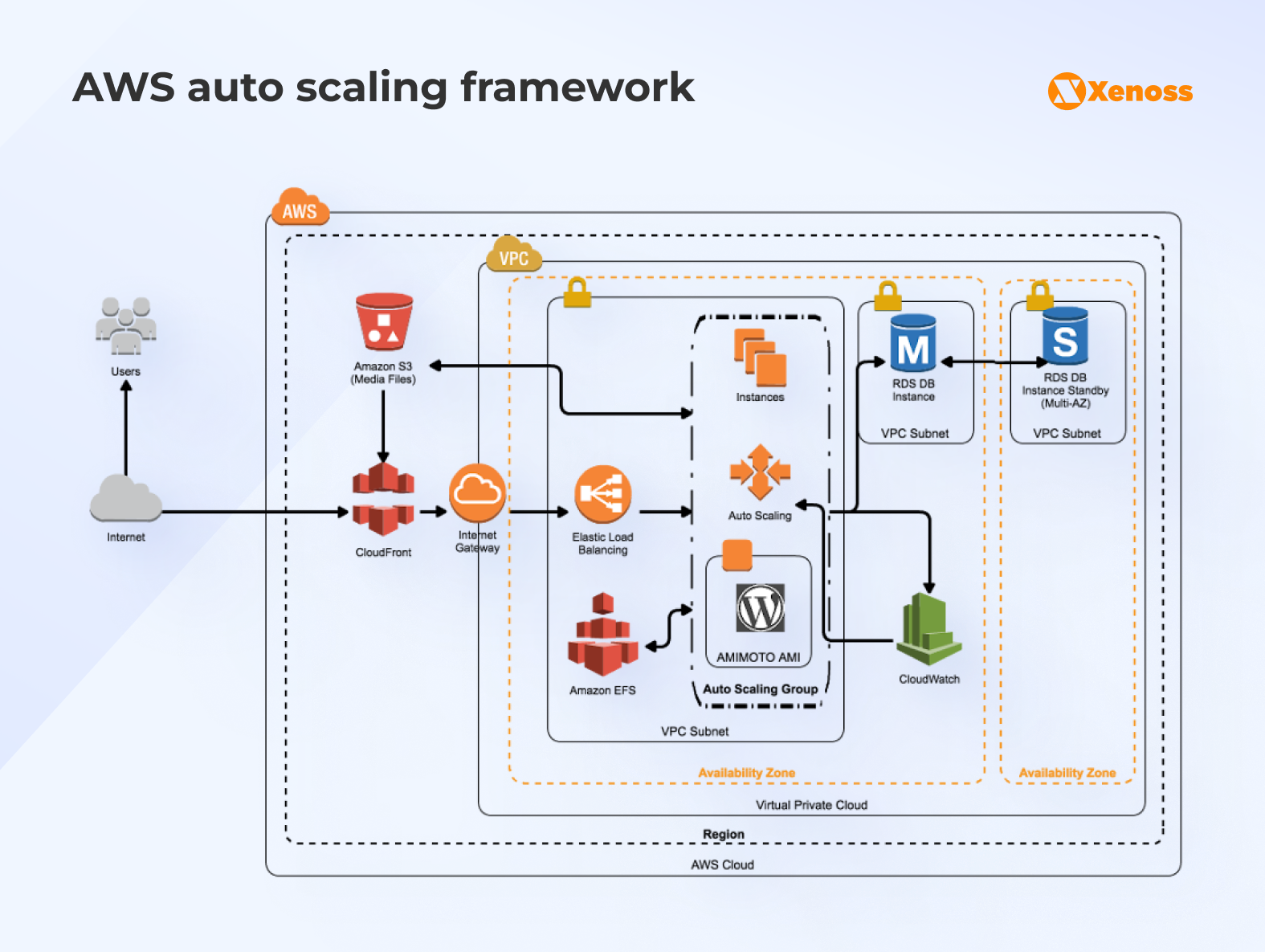
Spot instances reduce spend for fault-tolerant workloads. AWS spot instances often cost between 70% and 90% less than on-demand capacity. Use them for batch jobs, data processing, or stateless web services.
Distributed architectures often require additional tools for central logging, metrics collection, tracing, and health checks. These costs add up. Tune log retention policies, sampling rates, and ingestion rules to avoid unnecessary spend.
Conclusion
Both vertical and horizontal scaling solve performance problems. Neither approach works universally. The right strategy depends on your application architecture, user growth patterns, and reliability requirements.
Most production systems use a hybrid approach, which optimizes both performance and costs, and the best balance of:
- predictable database performance
- fast, flexible application scaling
- strong uptime and resilience
- cost-efficient growth aligned with demand
Your infrastructure should grow with your users and workloads.
Contact our infrastructure specialists to discuss your scaling challenges.