
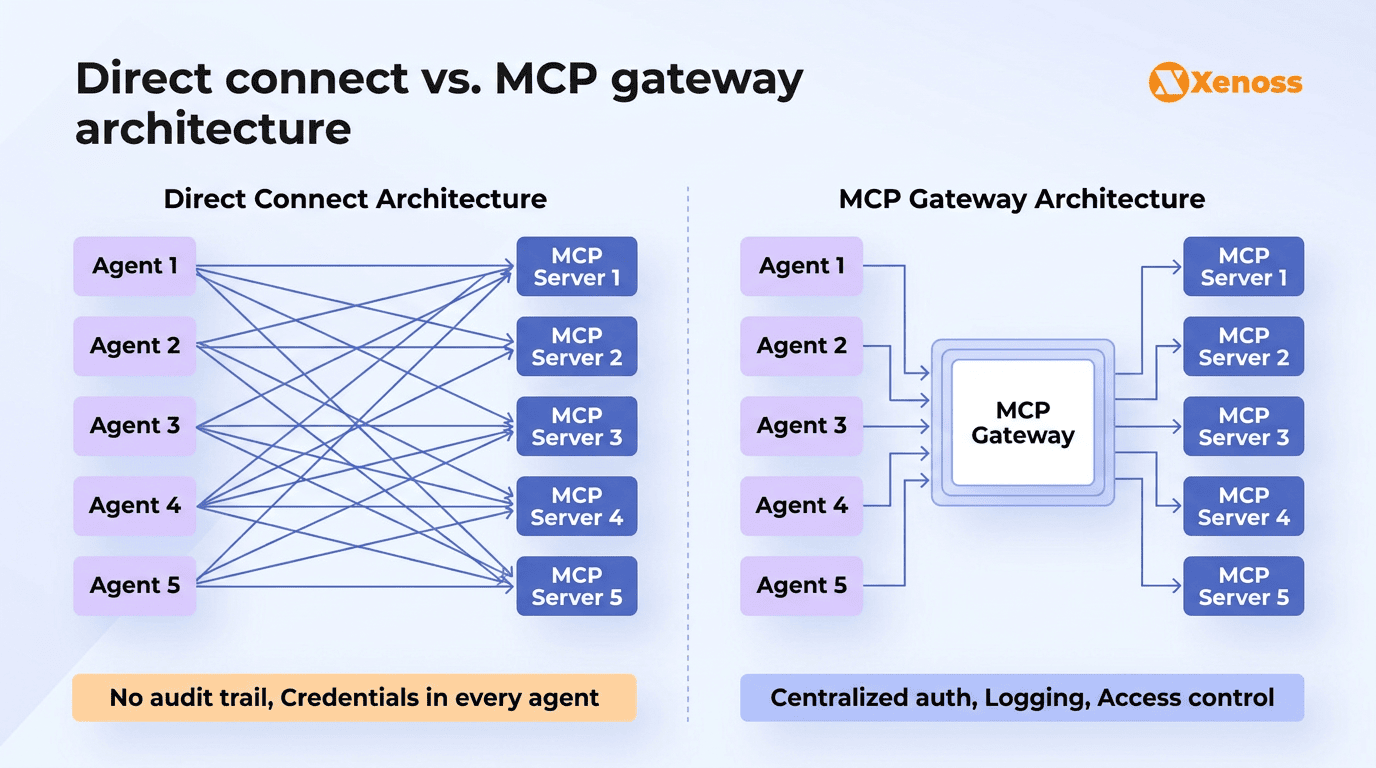
Your engineering team deploys five AI agents. One handles customer support tickets, another monitors infrastructure, a third automates sales outreach, and two more manage internal workflows. Each agent needs access to Slack, Jira, your CRM, two databases, and a handful of internal APIs. That is five agents times eight tools, which means forty individual connections, each with its own credentials, error handling, and retry logic. Now somebody on the security team asks a straightforward question: “Which agent accessed the production database at 2:14 a.m. last Tuesday?” Nobody can answer it.
This is the problem MCP gateways solve. The Model Context Protocol went from Anthropic’s open-source experiment to an industry standard backed by OpenAI, Google, and Microsoft in under two years. The official registry now lists over 9,400 servers, and adoption has crossed 78% among production AI teams. The protocol works, but connecting dozens of agents to hundreds of servers without a central governance layer creates a visibility gap.
This article covers how the MCP gateway architecture works, the three deployment patterns teams are using in production, how Docker and Microsoft Foundry handle it differently, and where managed gateways run out of road for enterprise environments with industrial systems and regulatory requirements.
Summary
- An MCP gateway acts as a centralized control plane between AI agents and the MCP servers they call, handling authentication, access control, audit logging, and traffic routing through a single governed endpoint.
- Three architecture patterns: reverse proxy (routes traffic, simplest to deploy), aggregation (merges multiple servers behind one endpoint), and multi-tenant (isolates tool access by team or agent identity).
- Docker and Microsoft take different approaches. Docker uses container isolation as the security boundary. Microsoft Foundry routes MCP traffic through Azure API Management with Entra ID integration. Cloudflare uses its edge network for Shadow MCP detection.
- Managed gateways handle standard SaaS integrations. Custom MCP server engineering is required for SCADA/IoT tool access, legacy system wrappers, and domain-specific compliance policies that no managed platform covers.
What is an MCP gateway?
Instead of every agent holding its own credentials and managing its own connections to every tool it needs, all requests flow through the gateway. The gateway handles MCP authentication, enforces access policies, logs every tool invocation, and routes requests to the right backend server.
That’s more what an API gateway does for microservices, but designed for the specific communication patterns of AI agents. Agents talk to tools differently than web apps talk to APIs: the connections are stateful, bidirectional, and session-based. An agent might discover available tools, call three of them in sequence while maintaining context, and then close the session. A gateway needs to understand that lifecycle to enforce policies properly.
Why does this matter? 42% of enterprises need their agents to access eight or more data sources. In a direct-connect model, adding one new agent means configuring connections to every tool it needs. Adding one new server means updating every agent that should have access. The complexity grows fast, and with it, the credential management burden, the observability gap, and the security exposure.
MCP gateway architecture patterns
Three patterns have emerged in production deployments. Each solves the same core problem (centralizing agent-to-tool governance) but at different levels of sophistication.
Reverse proxy pattern
The gateway receives MCP requests from agents, validates authentication, logs the invocation, and forwards the request to the target server. It does not modify payloads or combine server responses. This is the simplest pattern and the right starting point for most teams.
Cloudflare’s enterprise MCP architecture follows this approach: MCP Server Portals handle identity verification through Cloudflare Access, while AI Gateway captures logs and metrics for every tool call. Cloudflare also introduced Shadow MCP detection, which flags when employees connect to unregistered MCP servers on the enterprise network.
Aggregation pattern
The aggregation gateway merges multiple MCP servers behind a single endpoint. Agents see one interface that exposes the combined tool catalog of all downstream servers. The gateway handles tool discovery, dispatches invocations to the correct backend, and returns results as if they came from a single server.
Microsoft Foundry Toolboxes work this way: they bundle Web Search, Code Interpreter, Azure AI Search, MCP servers, and OpenAPI tools into one MCP-compatible endpoint.
Composio’s managed gateway does the same with 500+ pre-built integrations and unified authentication. This pattern fits when agents need broad tool access but should not be aware of backend topology.
Multi-tenant pattern
Enterprise environments need to control which teams or agent identities can access which tools. The multi-tenant gateway maps agent identity to tool permissions through integration with enterprise identity providers (Entra ID, Okta, SAML).
A marketing team’s agents might access CRM and analytics tools but not production databases. An engineering team’s agents might have read access to everything but write access only in sandbox environments.
MintMCP implements this through SCIM-driven RBAC, IdP groups, and Virtual MCP Bundles that define per-role tool sets. This is the most complex pattern to deploy but the only one that works for organizations running hundreds of agents with strict access controls.
| Reverse proxy | Aggregation | Multi-tenant | |
|---|---|---|---|
| Complexity | Low | Medium | High |
| Agent view | Agents route to individual servers | Agents see one unified endpoint | Agents see tenant-scoped tool sets |
| Auth model | Token validation at the gateway | Unified auth with per-server credential brokering | Identity-propagated, per-tenant policies |
| Best for | Early adoption, small teams | Broad tool access, managed integrations | Enterprise with strict RBAC needs |
| Production examples | Cloudflare MCP architecture | Composio, Microsoft Foundry Toolboxes | MintMCP, Kong MCP Gateway |
Docker MCP server and gateway: Container-based isolation
Docker’s approach treats each MCP server as an isolated container with controlled resource limits, network policies, and filesystem access. The gateway manages container lifecycles and routes agent requests to the right container. Everything runs inside your infrastructure, giving teams full control over data residency, network rules, and runtime configuration.
For teams already comfortable with Docker or Kubernetes, deployment is fast. You define MCP servers as container images, configure resource limits and network access per container, and the gateway handles routing. The isolation model is strong: if one MCP server is compromised, the blast radius stays within that container.
The trade-off is that Docker, rather than being a finished product, provides building blocks. Containerized isolation and routing are covered, but audit logging, identity management, policy enforcement, and centralized monitoring need to be layered on top.
For a small team experimenting with MCP in production, Docker is a solid starting point. For an enterprise that needs SOC 2-compliant audit trails, per-user access policies, and integration with Okta or Entra ID, additional engineering is required on top of Docker’s foundation.
Microsoft MCP gateway: Foundry and Azure API Management
Microsoft’s approach plugs MCP governance into Azure API Management. The Foundry AI Gateway provides a governed entry point where teams can enforce Entra ID authentication, rate limits, IP restrictions, and audit logging without modifying MCP servers or agent code. Every action runs under the signed-in user’s Azure RBAC permissions, so agents cannot exceed the permissions of the human behind them.
Foundry Toolboxes take this further by bundling multiple tools into a single MCP-compatible endpoint. An agent connects to one Toolbox URL and gets access to a curated set of tools (Web Search, Code Interpreter, Azure AI Search, MCP servers, OpenAPI endpoints) governed by a single policy layer. Tenant administrators can apply Conditional Access policies through Azure Policy to control MCP usage organization-wide.
For organizations already on Azure, this is the fastest path to governed MCP. The gateway reuses existing identity, networking, and compliance infrastructure, so there is no new security stack to evaluate.
The limitation is cloud lock-in: outside Azure, Foundry’s governance capabilities drop off significantly. Multi-cloud teams will need a different approach for non-Azure workloads.
MCP server security and authentication at the gateway layer
MCP authentication and security operate across four layers, and skipping any of them creates gaps that agents will eventually exploit, either by accident or through adversarial prompt injection.
Authentication. Every agent-to-gateway connection requires a verified identity. OAuth 2.1 with PKCE is the emerging standard for MCP authentication. Microsoft Foundry uses Entra ID tokens scoped to the MCP endpoint. Managed gateways like Composio handle OAuth flows automatically for 500+ integrations. For custom MCP servers connecting to internal systems, teams typically implement service-to-service auth using mTLS or API keys issued per agent.
Tool-level authorization. Authentication answers “who is this agent?” Authorization answers “what can this agent do?” A gateway must support tool-level granularity: agent A can call “read_customer” but not “delete_customer,” even when both tools live on the same MCP server. Role-based access control, tool allow-lists, and per-identity scoping are the minimum for enterprise deployment.
Audit logging. Every tool invocation needs a record: which agent, which user behind the agent, which tool, what parameters, what response, and when. This is non-negotiable for regulated industries.
The MCP roadmap explicitly calls out audit trails as a required enterprise capability. Gateways that capture this natively (Cloudflare AI Gateway, Microsoft Foundry, MintMCP) save teams from building custom logging infrastructure.
Threat protection. Tool poisoning (a compromised MCP server returning malicious instructions), Shadow MCP usage (employees connecting to unregistered servers), and prompt injection through tool responses are documented attack vectors. Cloudflare’s DLP-based Shadow MCP detection and Lasso Security’s triple-gate pattern (AI layer, MCP layer, API layer) represent current best practices for MCP-specific threat mitigation.
MCP gateway vs API gateway: Three differences that matter
If your organization already runs Kong, Apigee, or AWS API Gateway for microservices, you might assume those can handle MCP traffic too. They can route it. They cannot govern it properly. Three architectural differences explain why a dedicated MCP gateway or an LLM gateway with MCP support is needed.
Sessions, not stateless requests. API gateways treat each HTTP request independently. MCP communication is session-based: an agent opens a connection, discovers tools, invokes several in sequence while maintaining context, and eventually closes the session. Enforcing policies like “this agent can invoke a maximum of five tools per session” or “revoke access if the agent exceeds its context budget” requires session awareness that stateless API gateways don’t provide.
Tool-level granularity, not endpoint-level. API gateways authorize at the URL and HTTP method level. MCP gateways need to parse protocol payloads to understand which specific tool is being invoked within a server. Blocking “delete_records” while allowing “read_records” on the same MCP server endpoint requires protocol-aware inspection that standard API gateways don’t perform.
Agent identity propagation. API gateways authenticate the calling application. MCP gateways need to propagate the agent’s identity and the human user behind the agent all the way to the MCP server, so tool access reflects the user’s permissions. Microsoft handles this with Entra ID on-behalf-of tokens. Other gateways use custom headers or OAuth 2.1 flows. Without identity propagation, agents run with service-level permissions, which violates least-privilege principles.
Where managed MCP gateways need custom engineering
Managed gateways like Composio, MintMCP, and Microsoft Foundry handle the standard integration layer well: connecting agents to Salesforce, Slack, Jira, GitHub, cloud databases, and SaaS APIs. They cover maybe 80% of what enterprise agents need to access. The remaining 20% is where most organizations discover that managed gateways can’t reach.
Industrial and IoT tool access. Manufacturing organizations need agents that can query SCADA systems, pull sensor data from OPC-UA endpoints, or interact with PLCs on the factory floor. No managed MCP gateway ships with connectors for industrial protocols. Bridging the gap between AI agents and operational technology requires custom MCP server development that handles the authentication, latency, and reliability constraints of industrial environments.
Legacy system wrappers. Enterprise agents frequently need to read from mainframes, proprietary ERP instances with custom schemas, or internal tools built on legacy stacks. These systems expose non-standard interfaces (SOAP, custom RPC, file-based protocols) that no managed gateway covers. Wrapping these interfaces in MCP-compliant servers is a custom engineering project that requires understanding both the MCP specification and the legacy system’s behavior.
Domain-specific compliance policies. A healthcare organization’s gateway needs HIPAA-compliant data masking on every tool response containing patient information. A financial institution needs KYC/AML screening before agents can query customer accounts. A defense contractor needs ITAR checks on tool invocations touching export-controlled data. These are not configuration toggles. They are domain-specific policy layers that must be engineered for the specific regulatory environment and tested against real compliance scenarios.
Why this matters: The tools agents need to reach in regulated and industrial environments are the same tools that carry the highest risk. A managed gateway that covers Slack and Jira but cannot govern access to a SCADA system or enforce HIPAA masking on a patient database does not solve the governance problem where it counts.
Implementation roadmap for enterprise MCP gateway deployment
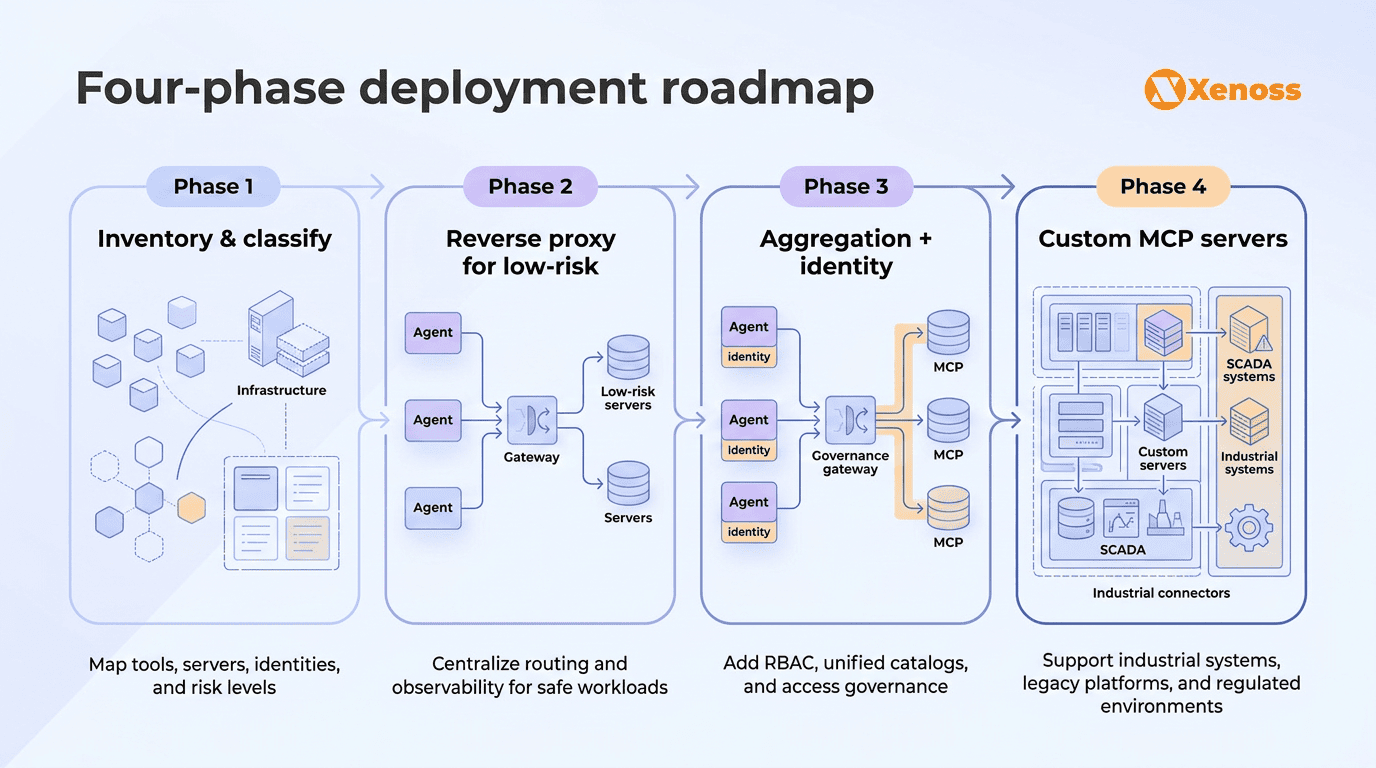
Phase 1: Inventory and classify. Map which agents access which tools, tag each connection by sensitivity level (low/medium/high), and identify which tools handle PII, financial data, or regulated information. This is the same access mapping exercise that identity teams run for human users, applied to agent-tool connections.
Phase 2: Deploy a reverse proxy for low-risk tools. Start with the simplest pattern. Route low-sensitivity, read-only tool access through a proxy gateway with authentication and logging. Docker’s container-based approach or Cloudflare’s architecture both work for this. The goal is audit trail coverage and a single point of visibility without complex policy logic.
Phase 3: Add aggregation and identity-based access for high-risk tools. Expand to the aggregation pattern for teams needing unified tool discovery, and add identity-propagated access controls for sensitive tools. Integrate with your existing identity provider so agent access follows the same permission model as human access. Microsoft Foundry or MintMCP add the most value at this phase.
Phase 4: Build custom MCP servers for edge cases. The final phase covers the tools and policies that no managed gateway handles: industrial protocols, legacy system wrappers, and domain-specific compliance logic. These are custom engineering projects that require a deep understanding of both MCP and the systems being connected.
Bottom line
MCP adoption has reached the point where connecting agents directly to servers without governance is a liability. With 78% of production AI teams using the protocol and over 9,400 servers in the public registry, MCP is an infrastructure. The governance layer around it needs to be just as mature.
An MCP gateway provides centralized authentication, tool-level access control, audit trails, and observability. The architecture pattern (reverse proxy, aggregation, multi-tenant) depends on your scale and security model. The platform (Docker, Microsoft Foundry, Cloudflare, Composio, MintMCP) depends on your existing cloud investments.
For most enterprise environments, the first three deployment phases can be handled by managed platforms. The fourth, connecting agents to industrial systems, legacy infrastructure, and enforcing domain-specific compliance, requires custom engineering. And that fourth phase is where the real governance risk lives.